Getting Started
Guides
Getting Started with Xstitchify
Xstitchify turns your ideas into cross-stitch patterns you can actually stitch. Whether you've got a photo of your cat, a favourite quote, or a WiFi password you want to share in the most extra way possible — we've got a tool for that.
Everything works right in your browser. No apps to install, no software to download. It works on your phone, tablet, laptop — whatever you've got handy.
Your four main tools
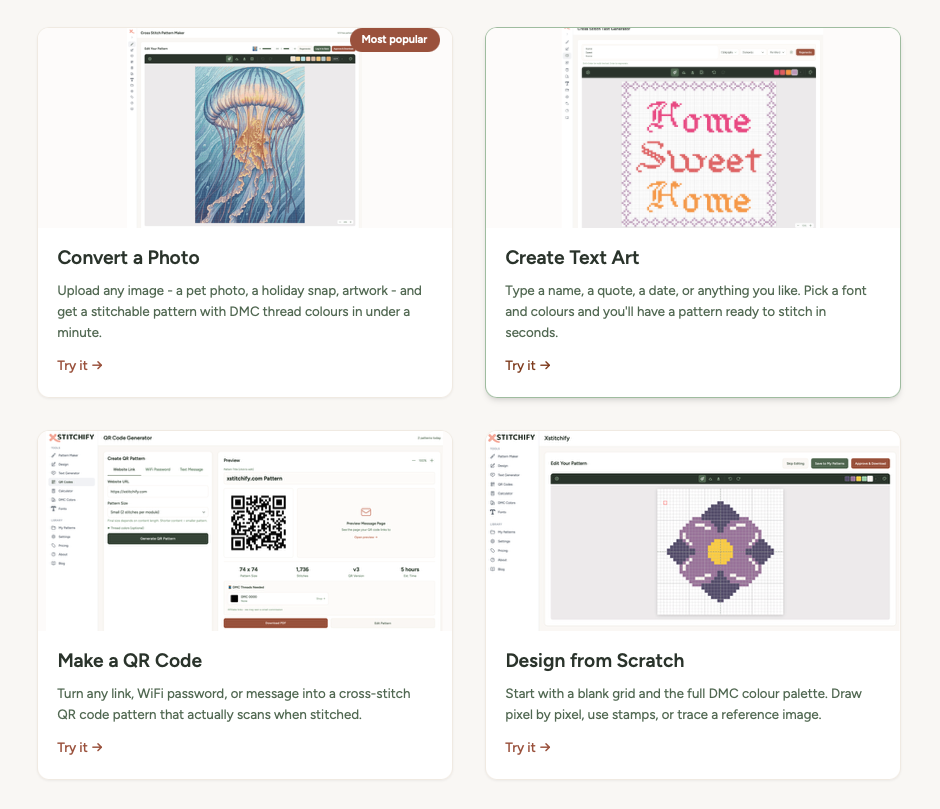
Pattern Maker
Upload any image — a photo, illustration, or logo — and convert it into a stitchable cross-stitch chart with DMC thread colours.
Text Generator
Type in a name, quote, date, or short message and pick from a range of cross-stitch fonts. Instant pattern, ready to stitch.
QR Generator
Make a QR code pattern that actually scans when you stitch it. Perfect for WiFi passwords, links, or a surprise Rick Roll.
Designer
Draw your own pattern from scratch on a pixel grid. Great for geometric designs, borders, and custom motifs.
Making your first pattern
The fastest way to get started is with the Pattern Maker. Here's the short version:
- Go to the Pattern Maker page.
- Upload a photo or image (drag and drop works too).
- Choose how wide you want the pattern (in stitches) and how many colours to use.
- Hit Generate Pattern and watch it appear.
- Edit if you like, then download your PDF or PNG.
That's it. Your first pattern in under a minute.
Tip: Start with a simple image — something with good contrast and not too much detail. A close-up photo of a flower or a pet's face works brilliantly. You can always try more complex images once you've got the hang of it.
How the free trial works
You can use Xstitchify for free straight away — no sign-up needed. Free users get a limited number of pattern generations per day.
When you create an account, you get a 7-day free trial with unlimited access to everything — no credit card required. That means unlimited patterns, unlimited downloads, and all the premium fonts and features.
After your trial, you can choose a paid plan to keep unlimited access, or continue using the free tier. Any patterns you saved during your trial stay in your library either way.
Where to get help
If you get stuck or something doesn't look right, there are a few ways to reach us:
- Reply to any email you've received from Xstitchify — it comes straight to us.
- Use the contact page to send a message.
- Check through these help guides — there might be an answer waiting for you.
We're a small team and we genuinely read every message. If something's broken or confusing, we want to know about it.